

Filter by stock
Start with items that could be sellable now.
Photopilot shows per product type where image or content is missing. This way, the team gets one action list for clothing, bags, suitcases, home products, and cosmetics, in order of sales opportunity.
Schedule a demo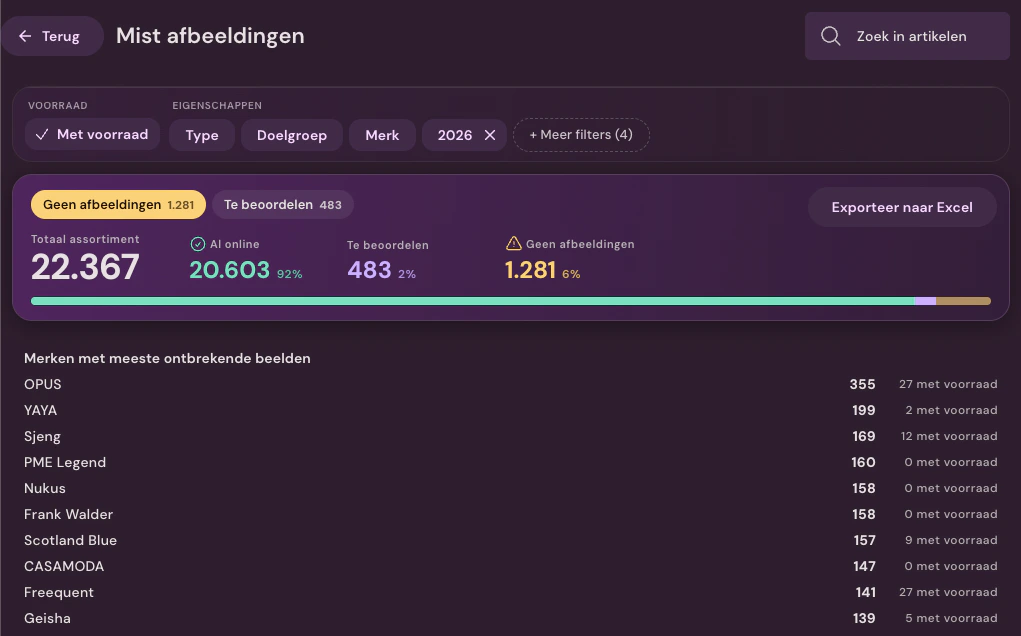
The report combines inventory with image status. That way, your team can see what is missing and what needs to be fixed first.
Items with stock and without images come first. This way, the team works on what can actually generate sales today.
The overview groups missing images by brand and shows how many of those items are currently in stock. You can see supplier images that are available right away, brands that still need to be activated, and what requires your own photography.
Export exactly the same selection as on the screen, so follow-up outside Photopilot doesn't need to be re-evaluated.
Start with items that could be sellable now.
See what is online, needs review, or is missing images.
Activate the brand, schedule your own photography, or let an existing source flow through.
Continue working in Photopilot or export the filtered selection to Excel.
The productivity report combines actions with active minutes, workdays, screen usage, and time between actions. This way, you discuss capacity with context and keep the focus on a collection that flows through faster.
Approve, reject, regenerate, and update content are measured as real actions.
Only the minutes when Photopilot is open and visible are counted. The report does not track anything that happens outside Photopilot.
Compare studio, processing, and content work without judging people by a single number. Only admins can see these figures.
The heatmap shows when the team is active and on which screens most time is spent.
Photopilot Reporting shows missing items, Fashion Cloud potential, and team productivity. You can see which stocked items lack usable images, which supplier images are immediately available, and which brand still needs activation. This gives the team a single action list ordered by sales opportunity.
Photopilot's report combines inventory with image status. Items with stock and without images come first, so the team works on what can actually generate sales today. Missing images are also grouped by brand.
From your own item source, such as the connection with ACA, LS Central, or SRS. That source remains the source of truth; Photopilot only uses stock levels to determine which items need images and text first.
Yes. The Excel export from Photopilot Reporting uses the same filters as the screen. You export exactly the selection you see, so follow-up outside Photopilot doesn't need to be re-evaluated.
No. Photopilot counts actions such as approving, rejecting, regenerating, and updating content, plus the minutes when Photopilot is open and visible; it does not see what employees do outside Photopilot. There is no clocking in or out, and only admins can see this reporting. The goal is to discuss capacity with context, not to judge people on a single isolated number.
Yes. Photopilot Reporting shows per product type where image or content is missing. This provides one action list for clothing, bags, suitcases, home products, and cosmetics. In a demo, you determine with Photopilot which reports match your daily work.