

- 01
Link source
Photos and product data are automatically received from suppliers, your own studio, or a custom data source. Photopilot reads the assortment, recognizes the product types, and suggests the right setup.
- Set one or more assortments at once
- Product types suggested based on your product feed
- Uncertain links visible for review
- 02
Photos with the right item
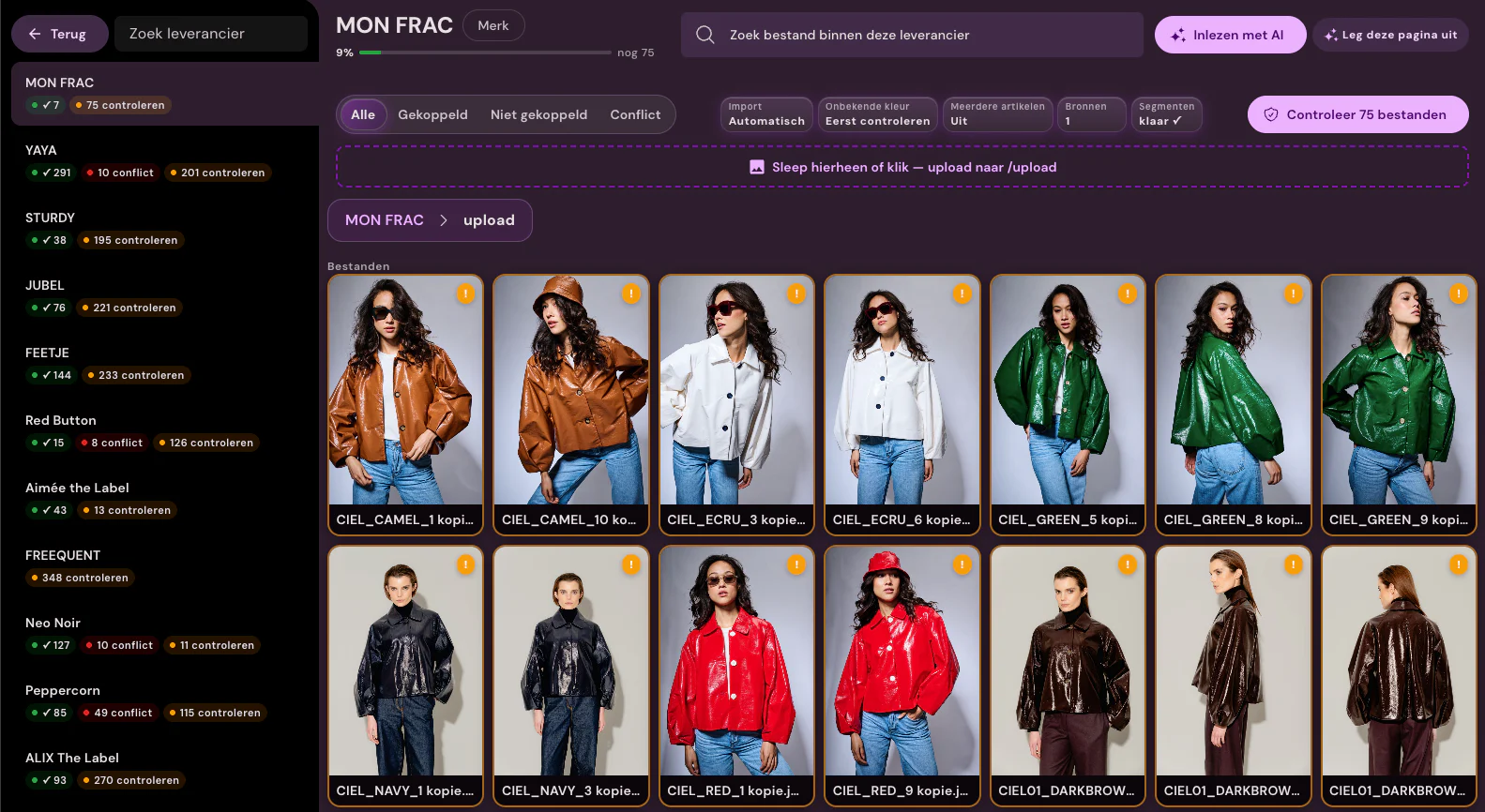
Photopilot links each incoming photo to the correct item and color. We use item data and barcodes for this. Your team no longer needs to sort the files.
- No manual sorting of which photo belongs to which item
- Extra assurance via barcode (EAN/GTIN)
- Edge cases and conflicts are queued separately for your team
- 03
Edit according to your brand style
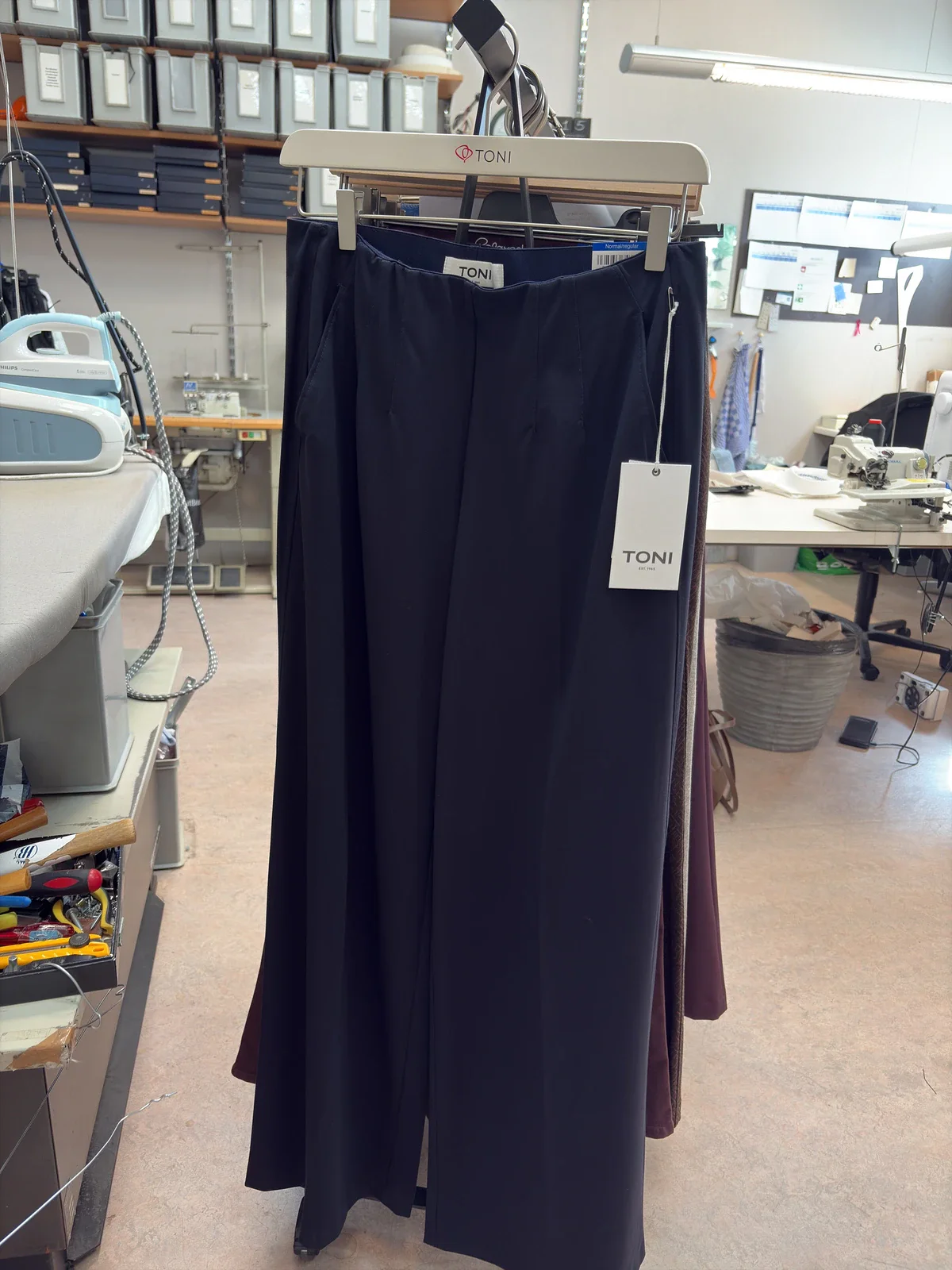
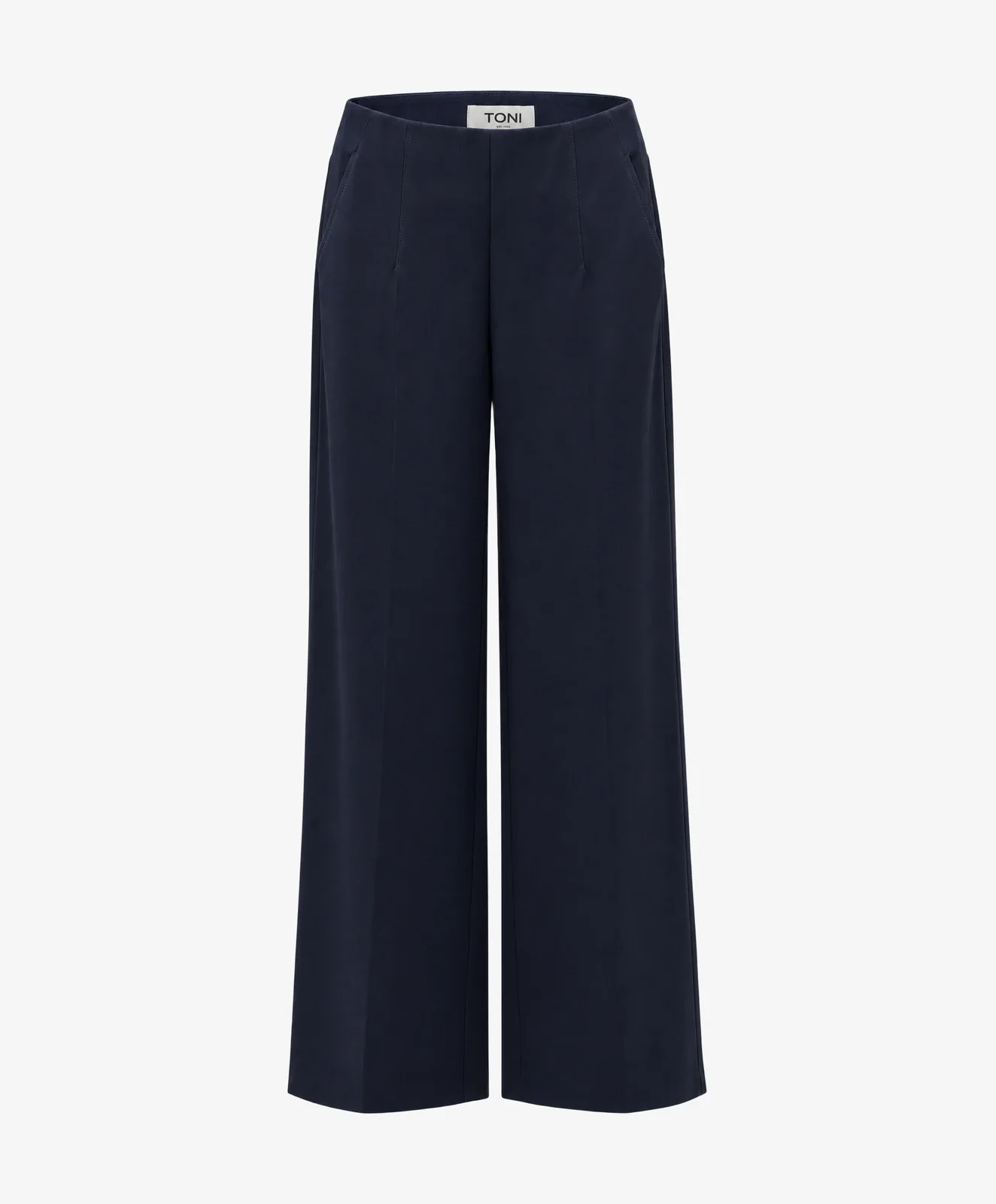
Photopilot edits each photo according to your image agreements. Cropping, background, color, and ratio can differ per article type, as you present pants differently from a shoe.
- Custom image settings per brand, collection, or item type
- Packshots, ghost packshots, and flat-lays automatically processed
- Removing mannequins and creating AI model photos is optional
Berden · rack photo → packshot - 04
Choose what can be automated
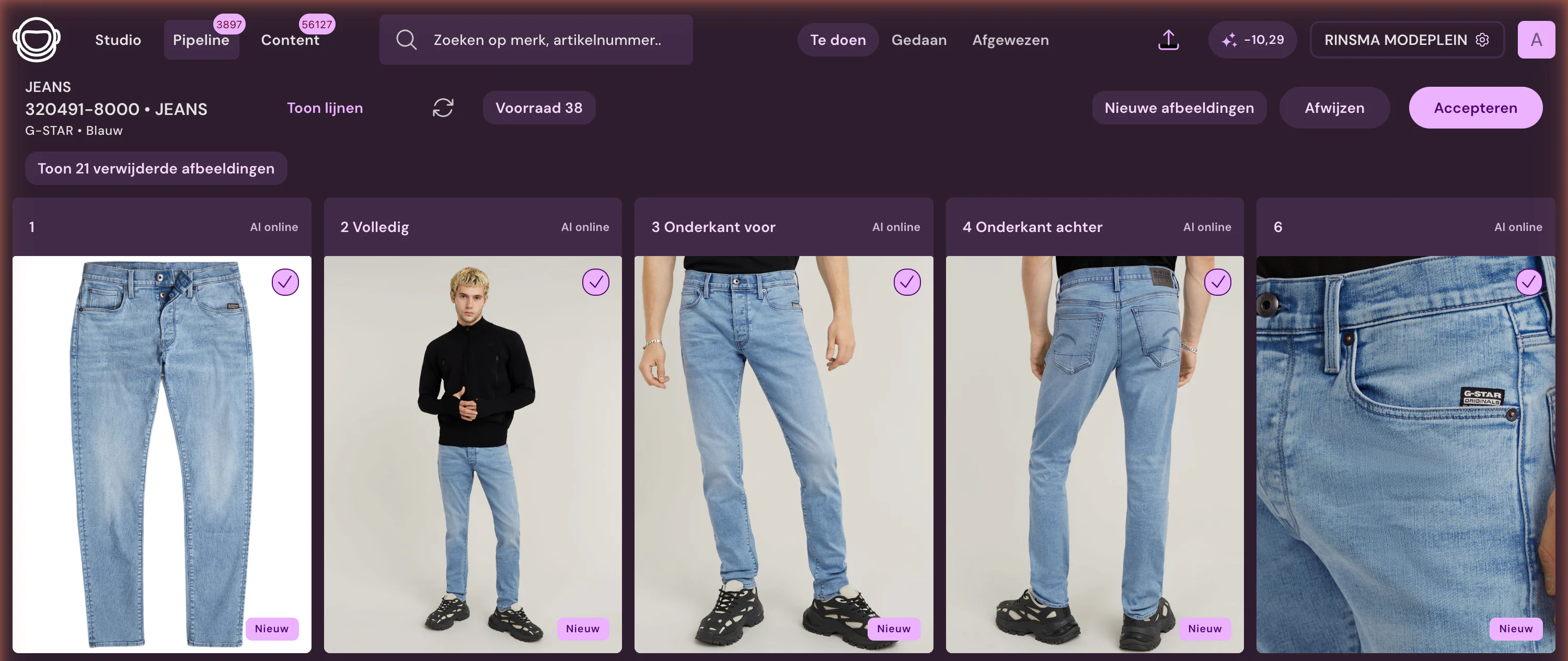
Control is optional. Per brand, collection, or item type, you decide whether images and texts are automatically approved or first appear in your team's overview.
- Automatically approve per brand or collection
- Check manually or in bulk where desired
- Exceptions, versions, and variants remain directly adjustable
- 05
Including product texts and translations
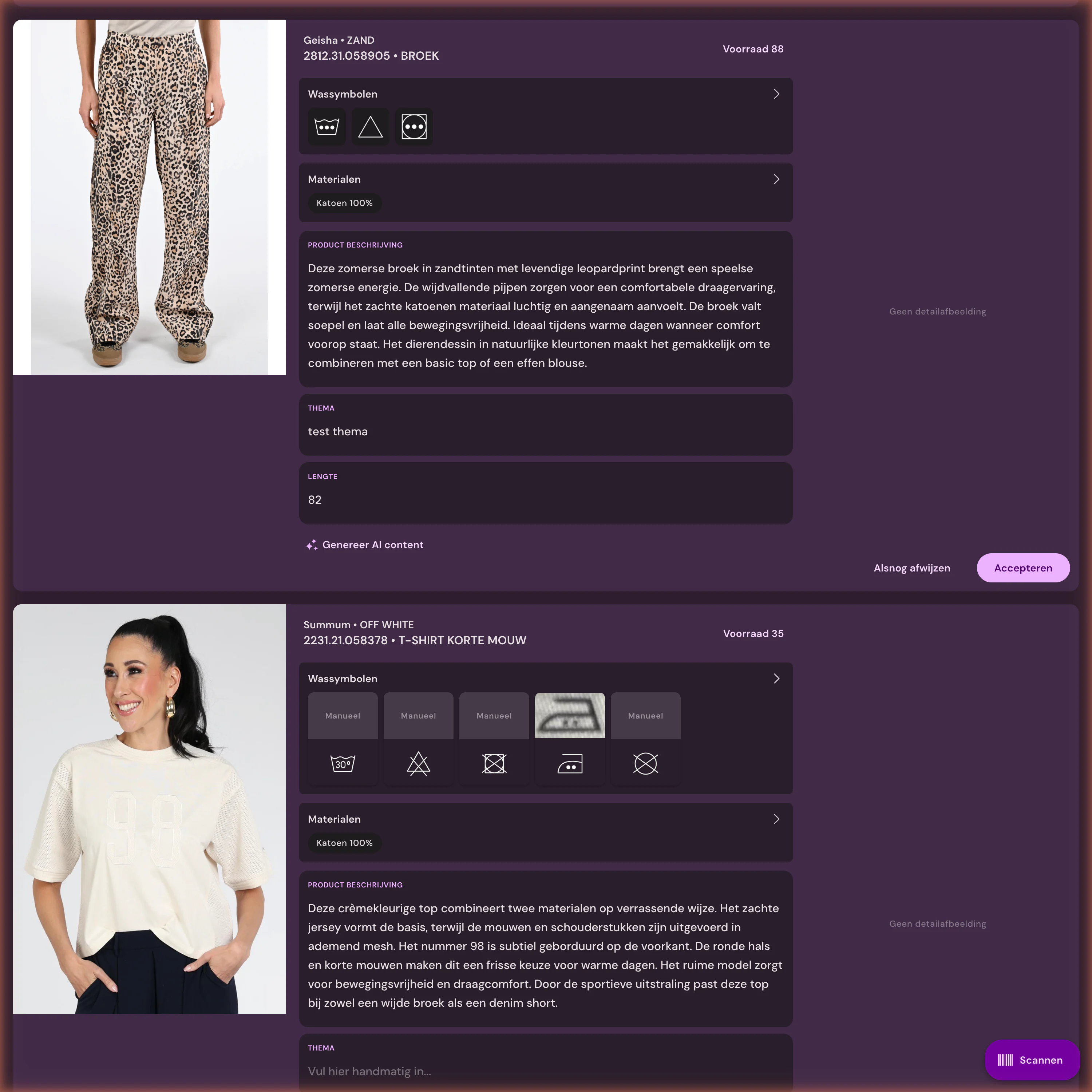
Photopilot creates product texts based on item data, material, care label, and your writing agreements. Translations are immediately ready for the webshop.
- Wash symbols are recognized and converted into readable washing advice
- Per brand, a unique writing style and text length
- Suitable for all languages in your webshop
- 06
Live on the webshop
Photos, texts, and product data go to the webshop together. You no longer need to export separate files, and everything ends up in the right fields.
- Directly to Shopware, Scayle, WooCommerce, or BigCommerce, or via FTP
- Filenames and order automatically correct
- Publish photos, texts, and product data simultaneously
- 07
Report and steer
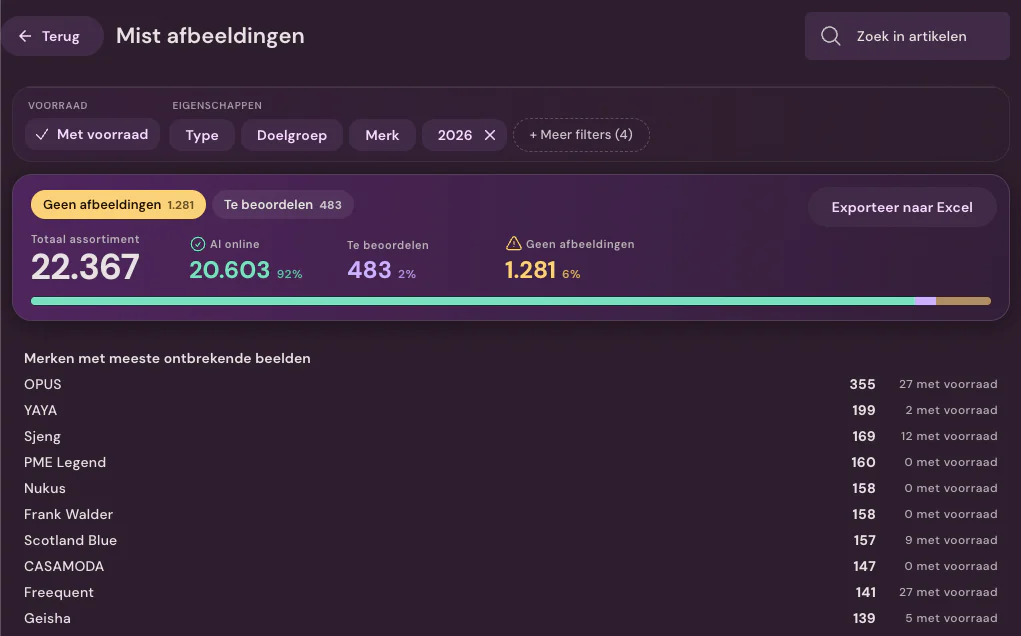
Even after publishing, you can see what still needs attention. Reports show which items are missing imagery, what Fashion Cloud can add and where the next collection can move faster.
- Missing images broken down by stock, brand and action
- Fashion Cloud potential: solve immediately, activate a brand or plan photography
- Lead time and work inventory per component and team
How Photopilot works
From supplier or studio to webshop: automatic, with control where you want it.
See how imagery, product data, and product copy move forward together, so your collection becomes sales-ready sooner.





From source to webshop in the same interface
Files arrive, follow the configured image rules, and can move automatically to publication. For each brand or collection, you decide what moves straight through and which exceptions your team wants to review.
Entry and matching remain visible
Per supplier, you see which images are automatically linked to article and color, which conflict, and which need to be released by a staff member first.
The Processing Route is Fully Configurable
Background removal, AI shadow, cropping, grid, color correction, and exceptions are in the order Photopilot executes them.
Full control when you want it
All image slots are grouped per item. You can manually review the set, view only deviations, or let reliable brands and collections automatically flow through.
Which collection will go online faster first?
In a demo, we look at your sources, channels, and collection size. Then you see which first workflow gets the most items ready to sell sooner.
Software tour: from source to webshop
See how supplier images, studio photos, image editing, product texts, styling, and publication align.
Supplier images
Fashion Cloud and Stockbase automatically retrieve supplier photos. You set up a brand portal, dealer environment, ZIP, or FTP once; brand-specific naming conventions and delivery-level version control make sure nothing is overwritten by accident. Every delivery ends with a clear status, so you can see what has been linked and what needs attention.
View modulePackshot editing
Supplier photos and your own photography are cropped, placed in the right template, and classified by image type without extra credits. You only pay per image when AI creates a new image, such as a ghost packshot from a mannequin photo, starting at €0.05. Approved results are automatically returned to the right item.
View moduleModel photography
Create model photos with AI from a single packshot, starting at €0.05 per image, and choose the right balance of speed, price, and quality. Studio photos and AI images are then edited and published in the same way.
View moduleStudio
Plan shoots by collection, assign models, and process studio photos automatically. You connect Canon directly through Photopilot Studio; photos from Capture One, Profoto, OrbitVu, or StyleShoots come in through a shared folder. After selection, editing and automatic or manual approval follow the brand's rules.
View moduleProduct texts
Enrich a complete product in a single AI run, from €0.01: product description, SEO, translations, and other configured output, based on product data, care symbols, materials, and set relationships. Each brand gets its own writing style and text length.
View moduleStyling
Combine items into complete looks in a visual interface. The links are sent to your webshop as Shop the Look or as item-level cross-sells. This lets the full look appear with each item on the product page.
View moduleImage rules
Define the crop, image order, and AI settings by brand, collection, or product type. Photopilot then automatically applies the right rules. That way, pants get a different crop than a dress or a bag, without anyone setting it up photo by photo.
View moduleReporting
See which items are missing images, with in-stock items at the top, what Fashion Cloud can add, and how the team is working, by day and by employee. Fashion Cloud potential shows what you can solve right away, which brand you can activate, and where you need to plan your own photography.
View module
Frequently Asked Questions
Which steps does Photopilot handle for us?
Photopilot retrieves photos and product data, links each photo to the correct product and color, and edits the images according to your agreements. Then, Photopilot creates product texts and translations and publishes everything to the webshop. Reports show which products still need attention.
Do we need to check each image ourselves before it goes live?
No, review is configurable. Per brand, collection, or product type, you choose automatic approval or review first, manually or in bulk.
What manual work is left for our team?
Only uncertain links and exceptions remain visible for review. No more searching for which photo belongs to which item or exporting individual files.
Can we set different image rules per item type?
Yes. You can set the crop, background, color, and ratio per brand, collection, or article type, because you present pants differently than shoes. Packshots, ghost packshots, and flat lays are processed automatically.
Does Photopilot also create product texts and translations?
Yes. Photopilot writes product texts based on item data, material, care label, and your writing guidelines, with a unique style per brand. Care symbols become readable care advice, and translations are ready for your webshop's languages.
How long does it take before we go live?
We typically set up the first working workflow, with one source and one destination, within one week. Integrations and onboarding are free. After that, we expand step by step to more sources, rules, and channels.
Can we start with one brand or collection first?
Yes. You start with one source and one destination, such as one brand or one collection. You configure image and text rules per brand and collection, so you can expand at your own pace.
Do we need to set everything up again for every new collection?
No. You define image rules, writing guidelines, and integrations once per brand, collection, or product type. Every following collection follows the same route.
How quickly can a product go online?
For our customers, a product takes a few seconds to two minutes of active work. For one of them, new products are online within 12 hours of arrival, and more than 60% are online before the stock even arrives.
Does Photopilot work with our own photographer?
Yes. Your photographer delivers through a shared folder, FTP, or ZIP, using filenames based on EAN, product number, or color code, and Photopilot links each photo to the right product. With a Canon camera, Photopilot Studio links the photo directly to the product.
What if the wrong image is linked to a product?
The review screen shows all image slots for a product together. You reject the wrong image or request a new one, and only approved images are sent to the webshop. If an image is already live, your export rules determine what the new version may replace.
Which languages does Photopilot support?
Photopilot creates product texts and translations in all languages of your webshop, with a separate writing style for each brand. The app and our support are available in English and Dutch.
What happens to the images when a size sells out?
Images belong to the product in a specific color, and all sizes share them. If a size sells out or a return comes in, the images stay in place. Reports on missing images prioritize products that are in stock.
How do AI house models and rights work?
A fully generated AI house model is not a real person: there are no portrait rights, model fees or buyouts. You only use a real face with documented consent, which you record yourself, and that model stays within your organization.